Pocket Software
A short guide to building an iPhone app for an audience of one.
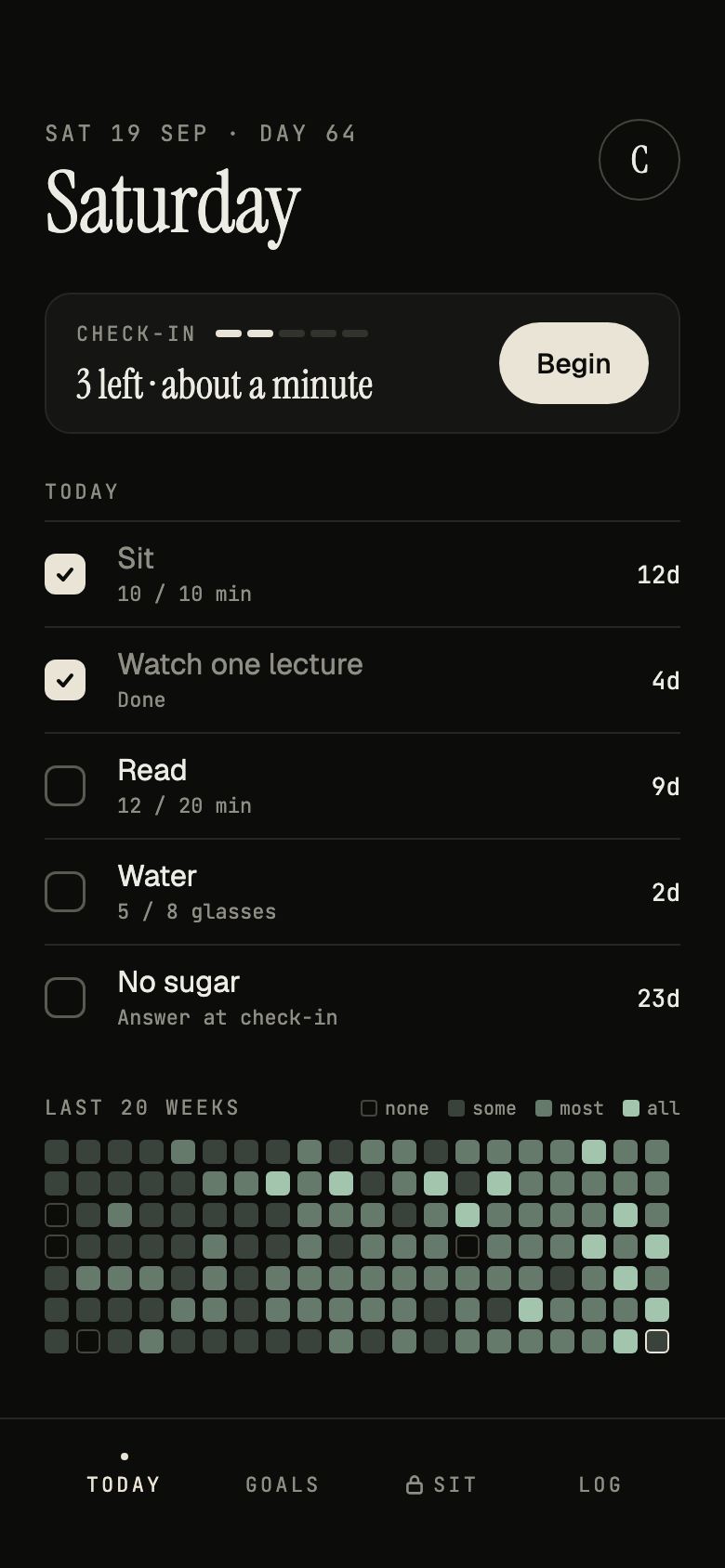
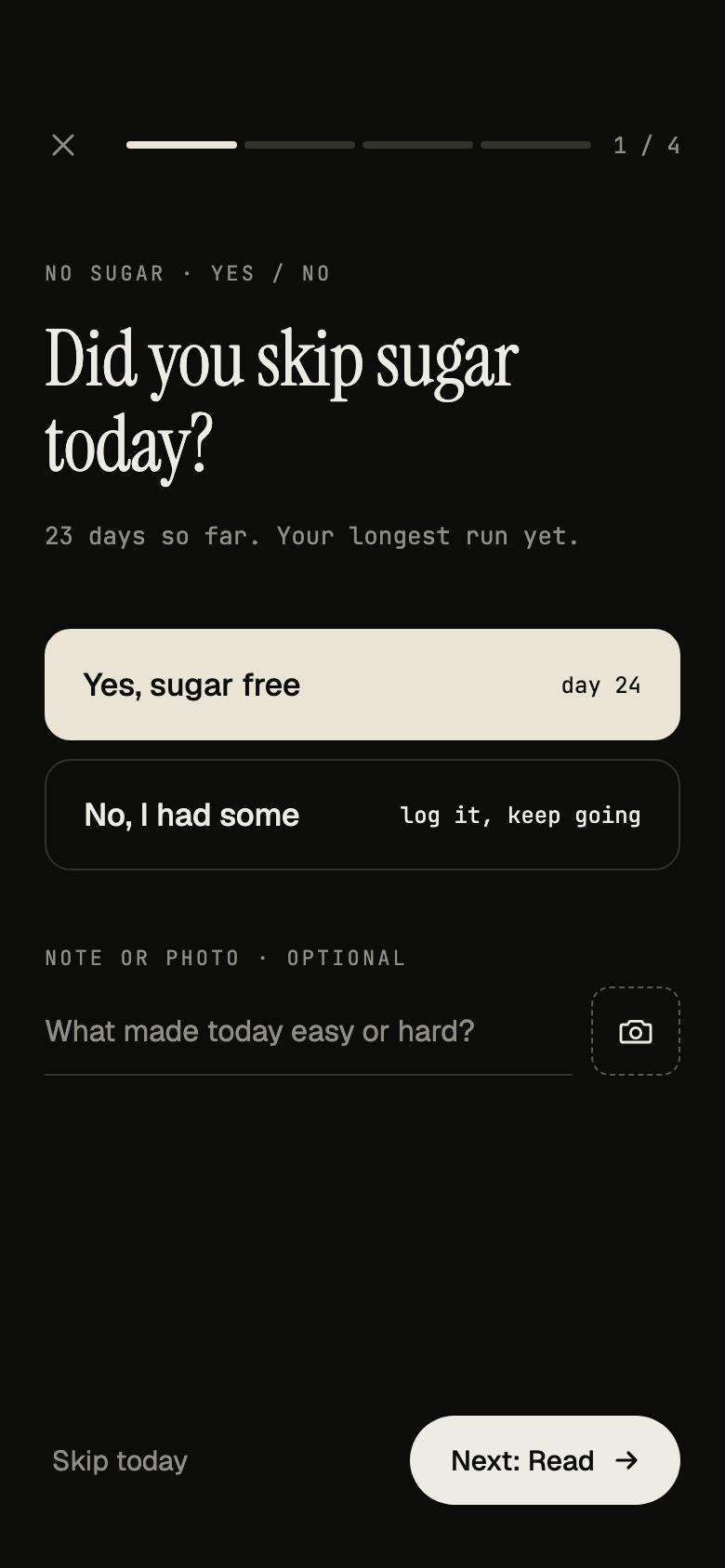
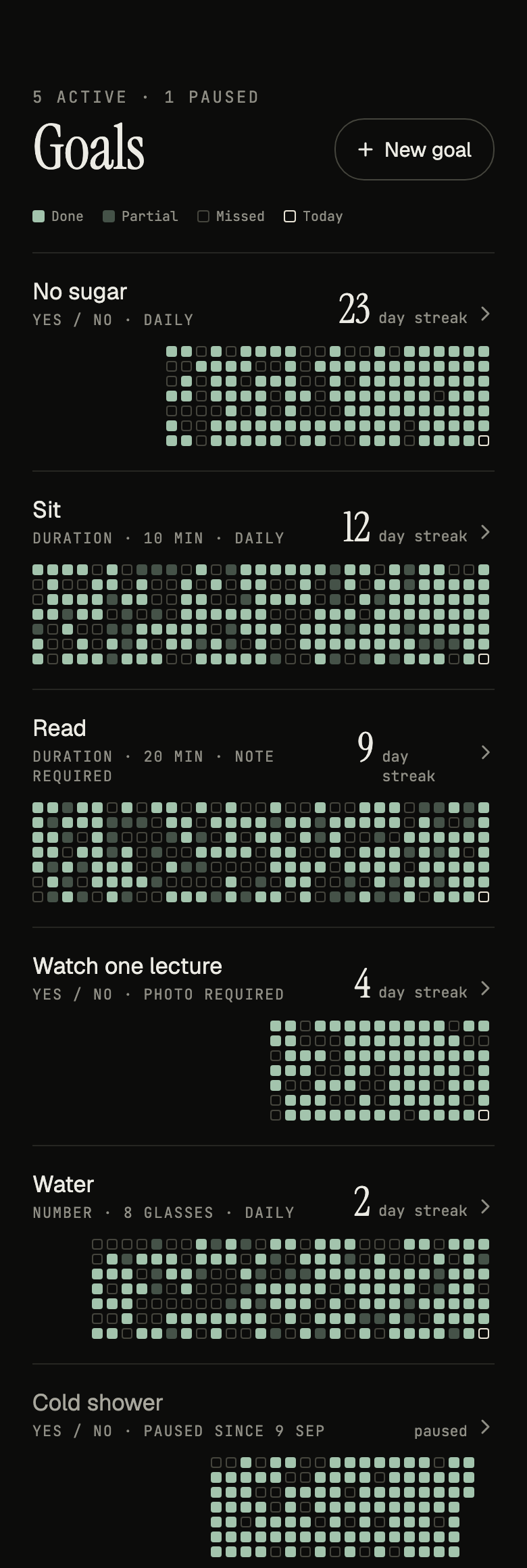
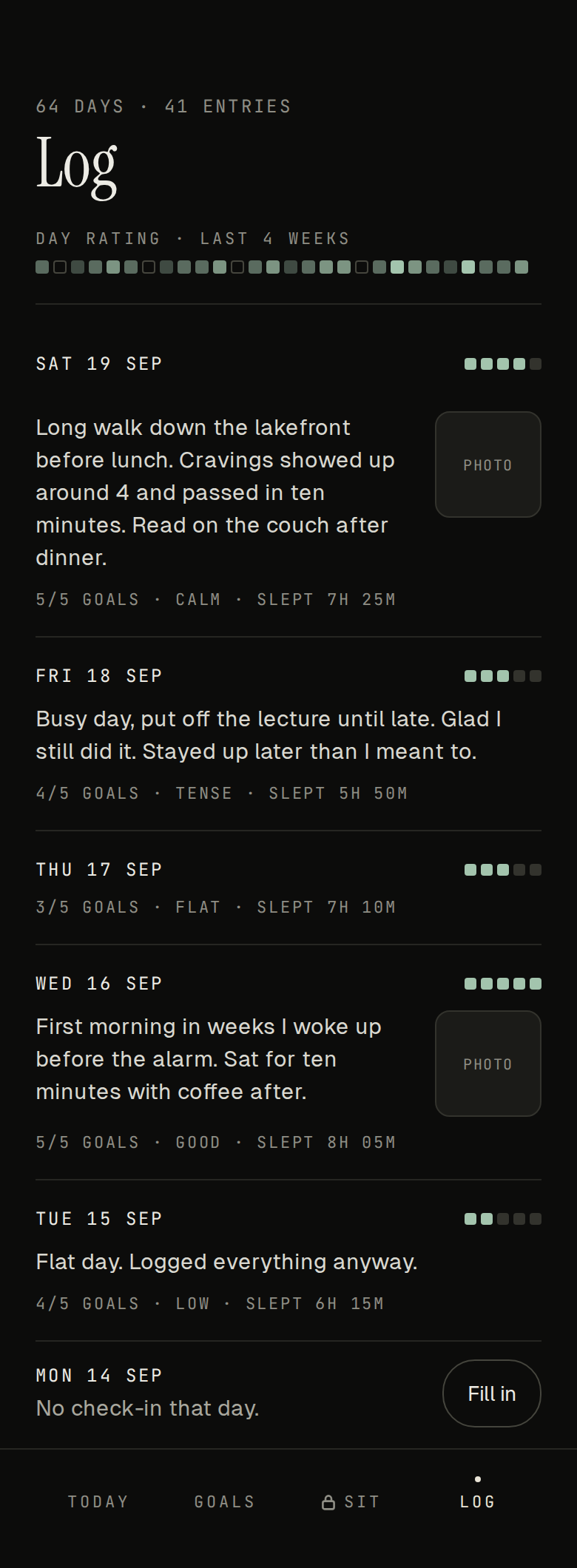
Margin is an iPhone app I built for myself. Once a day it asks me a few questions I wrote ("How long did you read today?") and every answer fills a square in a GitHub-style grid. It's not on the App Store, there's no login, and the data never leaves my phone. It's just for me, not the next Facebook, and not every idea needs to be. Sometimes it's a small problem nobody else bothered to solve, or a bit of whimsy you want to exist.
If you're reading this thinking "I'm not technical enough for this," you're who I wrote it for. I was never formally taught any of this. Everything technical I know came from taking an interest and poking at things until they worked. That's enough now: Claude writes the code, and your job is knowing what you want and being picky about it.
Below is the how-to: which Claude to use, how to design and build it, how to get it onto your phone (the Apple part nobody explains), and two prompts you can copy.
What you need
Tick the boxes as you go. Your progress saves in this browser.
Which Claude?
There are three ways to use Claude, and they do different jobs.
1. Claude chat (claude.ai, or the desktop and phone apps). A conversation. Good for thinking, writing a spec, and designing screens. It can't run anything on your Mac, so for an app it hands you code and you paste it into Xcode yourself, error by error.
2. Claude Code in the desktop app. Download the Claude desktop app, open the Code tab, and point it at a folder on your Mac. It writes the files, runs the build, reads the errors, fixes them, and installs the app on your phone. The easiest place to start.
3. Claude Code in Terminal. The same Claude Code, run from the command line. Install it once:
curl -fsSL https://claude.ai/install.sh | bash
Then make a folder for your app and start it there:
mkdir my-app && cd my-app
claude
Sign in with your Claude account the first time. This is the one I use, mostly because I run several at once in different Terminal tabs.
Either version of Claude Code beats chat for building:
- No copy-pasting. It edits the files directly.
- It sees its own errors. It runs the build, reads what broke, and fixes it before you ever see it.
- It installs the app. One command puts the new version on your phone.
- It remembers the project. The spec and code live in the folder, so every session picks up where the last one stopped.
Step 1: Plan
Write a few sentences in plain English before anything else:
- What it does. Pick something you'd use every day; you'll only keep improving an app you open.
- The rules. Margin has "one check-in a day" and "a missed day is a hollow square, not a red mark."
- What it never does. Mine: no accounts, no servers, nothing leaves the phone.
Keep the first version small. Add to it once it's on your phone.
Step 2: Design with screenshots
Collect screenshots of apps and websites you like the look of. Be specific: a font, how a list is spaced, a button, a color. Mobbin is a library of real app screens if you need a starting point.
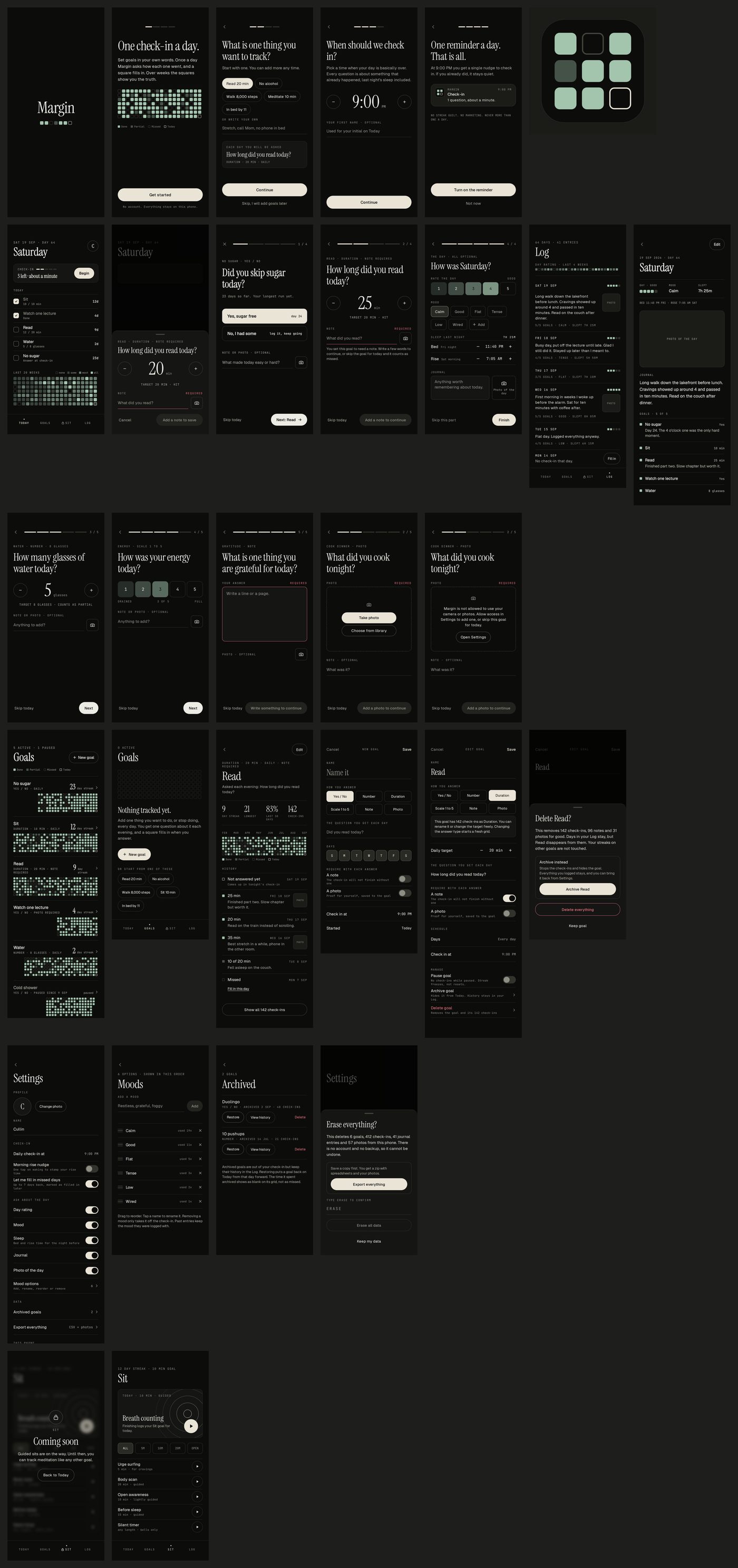
Give Claude the screenshots and your plan, and ask it to design every screen. Change colors, fonts, and spacing here, while changes are free. When it's right, ask for a spec (what every screen does) and the designs as images. Mine was one spec file and 30 screen designs, done in Claude on the web.
Step 3: Build
Put the spec and designs in your app's folder and start Claude Code there. Tell it to read the spec and build one step at a time, checking each screen against its design. It builds in SwiftUI (Apple's framework for iPhone apps) and writes tests as it goes.
You don't read the code. You use the app and say what's wrong: "the grid feels cramped," "move this button to the bottom."
Step 4: Get it onto your phone
tools/install-phone.sh. After this you don't need to open Xcode.Step 5: Change it
Tell Claude Code what to change, in a sentence. It makes the change and runs the install script. Reinstalling keeps your data.
Step 6: Keep it yours (for now)
Everything above gets an app onto your own phone. Getting it onto other people's phones is a separate path: the $99 developer account, a listing in App Store Connect, TestFlight for testers, and Apple's review before anyone can download it.
Design tips
Make it simple and joyful. You're the only user, so the bar is "do I want to open this?" Small moments count. When I finish a check-in in Margin, a check draws itself and today's square fills in. It takes half a second, and it makes finishing feel good.
Fewer screens, fewer taps. Every page and every tap is a chance to not bother. Margin's whole daily job is one check-in that takes about a minute. Before adding a screen, ask whether it could be a row on one you already have.
Fewer decisions. Every choice the app asks you to make is a small reason to close it. Use sensible defaults, make things optional, and bury the settings you'll only touch once. The less you have to think, the more you'll use it.
Take inspiration, then add your thesis. Don't feel bad about borrowing a layout you love. Everything is built on something. Margin's grid is lifted straight from GitHub's contribution chart. The thesis is mine: one check-in a day, questions in your own words, and a missed day is a hollow square instead of a red mark.
Remixing is cool. Stealing is Vanilla Ice explaining that "Ice Ice Baby" is totally different from "Under Pressure" because his bassline has one extra note. (Queen and David Bowie got songwriting credit anyway.) Only you get to decide what matters to you. But in a world full of copies, I'd urge you to think differently.
The prompts
Start Claude Code in an empty folder (desktop app: Code tab, pick the folder; Terminal: run claude inside it) and paste one of these.
If you want to be interviewed
Claude asks you questions first, then works in stages and stops for your approval after each one.
I want to build a personal iPhone app that lives only on my phone. I'm not a developer. You write all the code, I make the decisions, and you explain anything technical in plain English.

I'm following this guide. Read it first for context on the process and how to get the app onto my phone: https://www.cullinm.com/blog/build-your-own-app

Before you write any code, interview me. Ask one or two questions at a time, wait for my answers, and keep going until you can describe the app back to me in one paragraph and I agree with it. Cover:

1. The problem. What should this app help me with, and when in my day will I open it?
2. The core action. What's the one thing I'll do in it most often, and how long should that take?
3. The data. What do I put in, what does the app show me back, and do I need reminders, photos, or the camera? Store it locally, and ask whether I want an export so I can back it up.
4. Out of scope. What should it never do? Default: no accounts, no servers, all data stays on my phone.
5. The look. Ask me for screenshots of apps or websites I like and what I like about each one. Ask about light or dark, fonts, and colors.
6. My setup. Which Mac and iPhone I have, whether Xcode is installed, and whether I have a free Apple ID or a paid Apple Developer account.

Then work in this order, and stop for my approval after each step:

A. Write SPEC.md: what the app does, every screen, the rules (what counts as done, what happens when I miss a day, and so on), and what's out of scope. Keep it short enough that I'll actually read it. Flag every decision you made for me.
B. Design every screen as a single HTML file I can open in my browser, based on my screenshots. Keep it simple: as few screens, taps, and decisions as possible. Expect me to push back. Iterate until I say it's right.
C. Break the build into small steps, smallest useful version first.
D. Build it in SwiftUI with SwiftData, iOS 17+, no third-party dependencies, no backend. After each step, build it and tell me what to look at.

Getting it onto my phone: walk me through this one step at a time and wait for me to confirm each one. Signing into Xcode with my Apple ID, plugging in and trusting the Mac, turning on Developer Mode, picking my team under Signing & Capabilities, and the first run. If I'm on a free Apple ID, tell me the app expires after 7 days and how to reinstall it. Then set up wireless installs and write tools/install-phone.sh, a script that builds the app and installs it on my phone in one command, so I never need to open Xcode again.

How to work with me:
- Never ask me to write or edit code. If you need me to click something in Xcode or on my phone, tell me exactly where it is.
- When something fails, try to fix it yourself first. Only come to me when you need a decision or my hands.
- Use git and commit after every step that works, so we can always go back.
- Keep a short README with how to install and what's been built so far.
- When I describe a change in plain English, make it, run the install script, and tell me what to check.

Start with your first question.
If you already know what you want
Fill in the brackets. Claude makes its own calls and only stops when it needs your hands.
Build a personal iPhone app and install it on my iPhone. I'm not a developer: write all the code and never ask me to edit it. Read this guide first for context on the process: https://www.cullinm.com/blog/build-your-own-app

App: [one or two sentences: what it does and when I'd open it]
Screens: [list them, or "you decide"]
Look: [light or dark, fonts, colors, or "match the screenshots in this folder"]
Design: as few screens, taps, and decisions as possible. Sensible defaults over settings.
Never: accounts, servers, analytics, or third-party dependencies. All data stays on the phone.
Data: store locally with SwiftData. Add an Export button in Settings that saves everything as CSV (plus photos, if any) in one zip.

Stack: SwiftUI and SwiftData, iOS 17+, iPhone, portrait only. Generate the Xcode project from a project.yml with XcodeGen (install it with Homebrew if it's missing).

Process:
1. Write a one-page SPEC.md. Make reasonable decisions instead of asking me, and list them at the top so I can change them later.
2. Build the smallest useful version first. Build after every change and fix errors yourself.
3. Commit to git after each step that works.
4. Write tools/install-phone.sh: build a signed Release and install it on my paired iPhone with xcrun devicectl, over Wi-Fi when possible.
5. When you need me in Xcode or on my phone (Apple ID sign-in, trusting this Mac, Developer Mode, picking my team, Connect via network), give me exact numbered clicks and wait until I say done.

Only ask me a question if you're blocked. Start now.
Worst case, you lose an afternoon and learn what Xcode is.